27 November 2026
The benefits of user testing for Easy Read documents
Creating Easy Read documents is about more than writing some simple words. Once you’ve produced an Easy Read document, it is essential to check it is easy to understand and user-friendly. The best way to do this is to work with the very people the documents are created for – people with a learning disability.
Completing user testing through an Easy Read User Review is an invaluable way to collect feedback and suggestions from the people most likely to use Easy Read documents, to make sure you produce the best, customer-focused, Easy Read documents possible.
Although there are useful guidelines and standards for producing Easy Read, these do not guarantee a document is fully understandable for your target audience. Preferences such as tone and words that seem simple and familiar but are still difficult can only be learnt through talking to end-users. Direct feedback from this group is indispensable and helps you make sure your Easy Read is high quality and accessible.
Reviewing a document with a group, rather than just an individual, is the best way to make sure there is a consensus across the different types of people in the group and their different levels of understanding.
Learn more about Easy Read with this video.
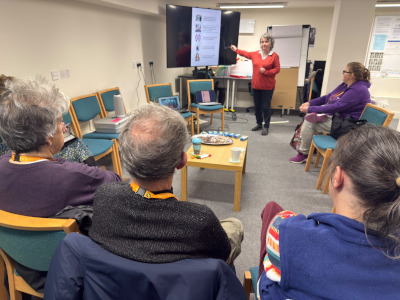
Benefits for the Easy Read authors
Core message
Each Easy Read document is a complete re-write of the original.
So, it’s important to know: Do the people in the User Group understand the main message of your documents? Can they explain in a few sentences what the document is about?
How the user group helps
The user group members tell us if they understand your Easy Read as intended, if they find anything confusing, and what could be improved. They will also give general feedback, and let you know whether the document is interesting and engaging.
Complex words and phrases
Wherever possible you should avoid the use of complex words and phrases in Easy Read documents. This seems like a simple guideline, however, what makes a word complex? Words can have double-meanings, negative and positive associations and be familiar yet difficult to sound out and say. There are a huge range of learning disabilities, so it is helpful to know the level of understanding of the people who will read the particular document, if possible, so you can target the language used accordingly.
1. Words you don’t hear often.
It is usually easier to understand words that are used in daily life. However, you might sometimes use a word so often that you don’t realise it is hard to understand for someone with a learning disability.
Some common examples include
- ‘Responses’, a more simple word would be ‘answers’.
- ‘Excellent’, it’s easier to read and understand the words ‘very good’.
2. Long words, or words that are hard to spell or pronounce.
It’s important to recognise that people with a learning disability often find reading difficult. This means they might understand a spoken word or phrase, but struggle with the same words written down because if there are long, or hard to spell or pronounce.
(To avoid this concern you could ask A2i to make an Easy Read video of your information instead of a written document).
Some common examples include
- ‘comfortable’, as it is familiar but not-phonetic
- ‘Necessary’, a word that is easier to read might be ‘important’.
- ‘Understandable’, shorter words are ‘simple’ or ‘clear,’ or you could use the phrase ‘easy to understand’ instead.
How the user group helps
Discussing a document together with the end users highlights complex words and phrases that you should take out of your Easy Read, or define.
Definitions
Sometimes it’s impossible to avoid the use of a complex word. On occasion the document author will stipulate that a particular word or phrase must be included. Sometimes it’s best for the reader to know the difficult word so they are prepared for when others around them use it, this is common in medical settings..
Therefore, if you use a complex word in Easy Read, you must also define that word.
Some common examples include
- Accessible: Accessible means something that can be used by everyone.
- Bus lane: a bus lane is part of the road that only buses can drive on.
How the user group helps
The User Group members will read a document aloud so you will be able to hear any words they find hard to read or understand. It is a good opportunity to talk about the meaning of words and their understanding of them, and to adjust the phrases used in the Easy Read if appropriate. Is the definition correct and understandable for the readers?
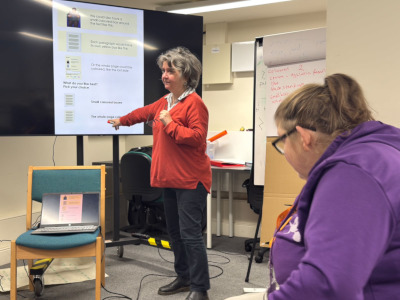
Jargon, acronyms and abstract ideas
Professional Easy Read transcribers, such as A2i’s staff, know to avoid jargon in Easy Read. We also generally avoid acronyms unless they are extremely well know such as ‘NHS’. However, if you are trying to write your own Easy Read, there is the risk of jargon, acronyms and abstract ideas creeping in. If you are writing about a topic you know well, you may not realise your jargon and acronyms are hard for other people to understand.
Some common examples include
- A bug in a system – you don’t want readers to get confused with insects crawling around inside their computer
- Touch base – readers might think they need to physically touch something
- RSVP by x date – a better phrase is ‘Please tell us what you think by x date’.
How the user group helps
Members of the User Group will highlight if there are jargon and acronyms they do not understand and the Easy Read can be adjusted. You might also find it is OK to use some phrases and acronyms for particular topics that are very familiar to people with a learning disability. Used in the right way acronyms can support the reader and shorten a document.
Alarming words or images
You don’t want to scare your reader! Some concepts can be worrying or alarming. For example, people with a learning disability may have negative or real life associations with health and care, so related content can be concerning.
How the user group helps
Members of the User Group will say, or visibly show, the content that worries or alarms them. They can also explain the reason, which can help the author to amend the words or change the images in the right way, so the content is still helpful and the readers feel comfortable. The author can also consider a trigger warning at the start of the document.
Photos and images
Photos and images are hugely important in Easy Read documents. Primarily, they support the reader to understand the text. However, we all know that images convey considerably more than that. Factors like the age, ethnicity, background and sex of people in the images is important, and what is appropriate will vary for each document. Whether people in photos have a disability or not is also key – people with disabilities want to identify with the people they see, they want to see people that look like themselves.
How the user group helps
The User Group members help us learn which images are most effective and increase their understanding of the text. They will let you know the images that they particularly like. They also let you know if the image used and the words conflict in their understanding, if some images don’t make sense or are too similar to others, if they think the mix of people in the images is poor, and more.
Read more about the sort of feedback we get about images in our blog about some image sessions with our User Group.
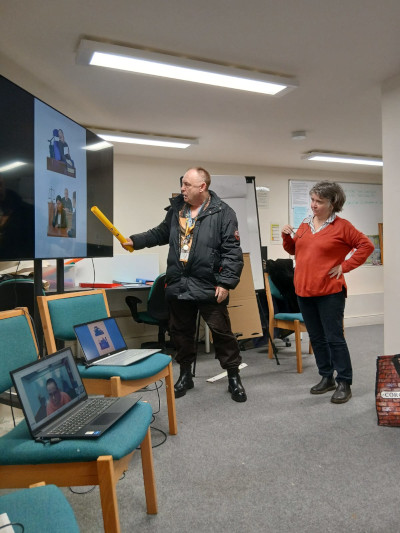
Structure, style and layout
The structure and layout of your Easy Read document can have a huge impact on how readable it is
For example:
- font size and type
- spacing of paragraphs and images
- the use of headings and subheadings and other styles
- use of colour
- use of tense and tone
- document length
How the user group helps
Although there are guidelines, structure and layout might vary for each document. The User Group will discuss the above and help you decide if you should reduce your Easy Read or split it into multiple booklets. A2i have received valuable feedback in particular about the layout of surveys in Easy Read, and this has informed our transcription of Easy Read surveys and forms to make positive changes.
Benefits for the Easy Read User Group members
Each time we meet, our User Group members remind us of the benefits to them of our meetings. They always say how much they thoroughly enjoy their in-person sessions with us. The experience is useful for them in both a professional and personal way.
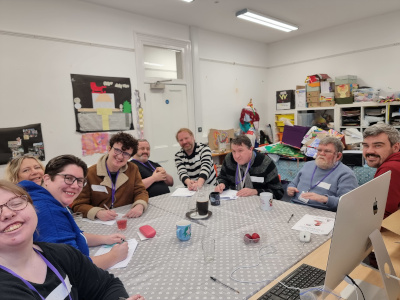
1. Enjoyment.
A2i’s User Review Group sessions are interactive with exercises and games to make the sessions relaxed and fun. This helps the participants to concentrate and give their valuable feedback in a productive and clear way.
We always take plenty of healthy (and some not-so-healthy) snacks and have breaks to socialise too.
2. Influence
Our User Review members gain the opportunity to influence how we produce documents they will potentially use. They know this helps to make Easy Read documents better for both their group, and people with a learning disability across the country.
3. Skills
Our sessions help participants improve important skills, for example, communication and team working skills. This is good practice for day to day life and will also help them with future job roles.
4. Confidence and that feel-good feeling
Our User Review members know their opinions are important and valued. The way we run our sessions means they have the confidence to participate and provide valuable input. At the end of each session there are positive vibes and a sense of achievement.
5. Pay
Our members are rightly paid for their expertise and time.
How A2i can help you get your Easy Read documents reviewed
If you do not have your own group of people with a learning disability to consult, A2i offer a service called our Easy Read User Review.
For our Easy Read User Review we work with a local group to read, check and review Easy Read documents, to ensure they are high quality and easy to understand. The group comprises adults with learning disabilities, along with their support workers.
By using this service you can ensure your Easy Read documents are approved by people with learning disabilities.
Would you like to find out more about our Easy Read user review service?
Visit our Easy Read webpage and read our other Easy Read User Reviews blog to find out more about this service.
Contact our friendly team to discuss your requirements and find out how we can help.
Email: info@a2i.co.uk
Telephone: 0117 944 0044
Quote form: https://a2i.co.uk/quote-request/